System Bank Accounts
SYSTEM BANK ACCOUNTS
BY

System Bank Accounts
Creditor bank details are held in System Bank Accounts.
NB! Claims & Pensioner associated accounts are not loaded here.
Go to the Administration Menu at the top of the screen. Select Financial Settings and then System Bank Accounts.

Select the type of creditor account you want to view.

The screen that opens will reflect all currently loaded creditor accounts, for that type, on the system.

Pressing Ctrl + F on this screen will bring up a search function option.

When searching make sure to search for full names (or part thereof) AND abbreviations. e.g., PWC OR Price Waterhouse Coopers.
Adding a New Creditor Bank Account
Double click on “Click here to add a new row” to add the new record.

Populate the relevant details and then select “Update”.
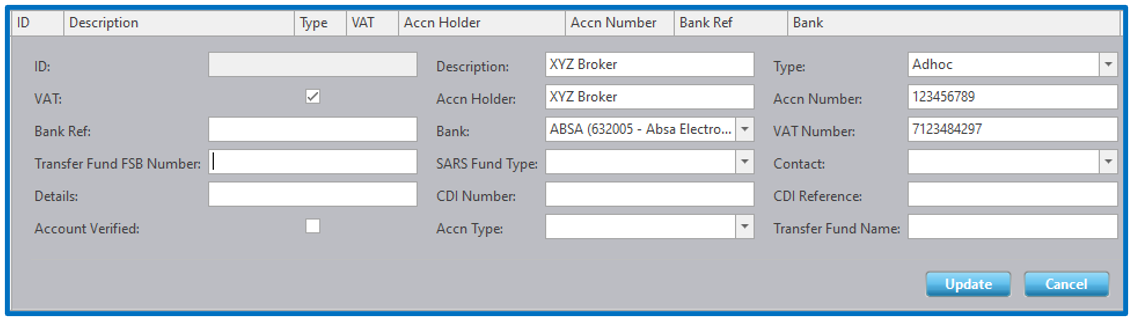
A note about the “VAT” indicator – Expense creditors, e.g., administration fees and consulting/broker fees, often require the VAT to be reported on all communications IF they are a VAT vendor. Ticking the VAT indicator will ADD VAT on top of the fee indicated on the expense. In these cases, make sure that the expense loaded is exclusive of VAT.
Disclaimer and Copyright
DISCLAIMER
Please note, whilst care is taken to illustrate numerous scenarios, it is impossible to detail all instances and therefore this document should merely serve as a guide for the purposes of demonstrating system functionality and conducting employee training.
In accordance with the above paragraph, this training manual is published and distributed on the basis that EBSphere (Pty) Ltd is not responsible/accountable for any actions taken by users of information contained in this training manual nor for any error in or omission from this manual.
EBSphere (Pty) Ltd does not accept any responsibility whatsoever for a misrepresentation performed by any person in respect of claims, losses or damage or any other matter, either direct or consequential arising out of or in relation to the use and reliance, whether wholly or partially, upon any information contained or products referred to in this manual.
Further, the contents of this training manual are subject to change without any notice and further highlight the need for this training manual to serve only as a guide.
COPYRIGHT
This documentation and the software described in it is the exclusive property of EBSphere (Pty) Ltd. This manual or the software may not be copied in whole or part, without the express written consent of EBSphere (Pty) Ltd. Under the law, copying includes translating into another language or format.
EBSphere (Pty) Limited
P.O. Box 785803
Sandton
2146