pull-requests
Last modified by Rudi Marais on 2023/05/22 23:50
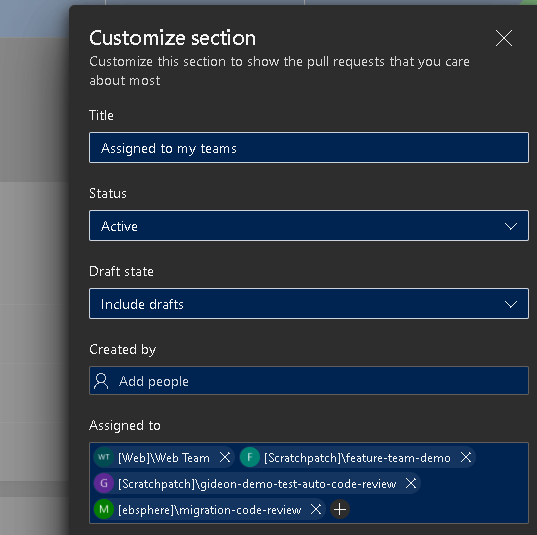
Setup "My Pull Requests"
This allows you to see pull requests under a repository on your dashboard
- Go to: https://dev.azure.com/ebsphere/
- Click on "My Pull Requests"
- Click on "Customize View"
- Click on "Assigned to my teams"
- Under Assigned to put the review team ie: migration-code-review
Sample screenshot
Viewing Pull Requests
You can view all pull requests across all repositories by going to the "My Pull Requests" landing page: https://dev.azure.com/ebsphere/_pulls
Policies
- There is a group setup for each repository that deals with code review
- Only members in this group can approve a pull request and the default required reviewer is 1
- You cannot approve your own pull request
- You cannot approve someone elses pull request if you where last to make changes to the branch
- When a new change has been pushed it will reset the approved viewer count
- If any outstanding issues/comments are on a pull request it will block the pull request until resolved
- The merge back to master is restricted to a squash merge, this prevents polluting the history see Merge strategies and squash merge - Azure Repos | Microsoft Docs