FAQ
Last modified by Rudi Marais on 2026/04/16 11:19
- dotnet
- .net framework - assmebly bindinds - fusion logs
- GIT trust all cert (handy when working over vpn)
- GIT repository path 'C:/xxx' is not owned by current user.
- fix dev cert issue with .NET core
- sql
- check SSL cert
- generate PFX from pem/crt/key
- windows 11 - context menu fix
- nuget - get local cache locations
- powershell disable execution policy
- powershell start azure vm
- download ssl certificate
- sql - drop all temp tables for this session
- azure sql - allow azure services to access db
- allow msbuild nuget to authenticate with azure
- prevent server from kicking session when busy with import job
- Copy scripts from sql with linebreaks and formatting intact
dotnet
- How do I ...
.net framework - assmebly bindinds - fusion logs
Set-ItemProperty -Path HKLM:\Software\Microsoft\Fusion -Name ForceLog -Value 1 -Type DWord
Set-ItemProperty -Path HKLM:\Software\Microsoft\Fusion -Name LogFailures -Value 1 -Type DWord
Set-ItemProperty -Path HKLM:\Software\Microsoft\Fusion -Name LogResourceBinds -Value 1 -Type DWord
Set-ItemProperty -Path HKLM:\Software\Microsoft\Fusion -Name LogPath -Value 'C:\FusionLog\' -Type String
Set-ItemProperty -Path HKLM:\Software\Microsoft\Fusion -Name EnableLog -Value 1 -Type DWord
mkdir C:\FusionLog -Force
Set-ItemProperty -Path HKLM:\Software\Microsoft\Fusion -Name EnableLog -Value 0 -Type DWord
Set-ItemProperty -Path HKLM:\Software\Microsoft\Fusion -Name LogFailures -Value 1 -Type DWord
Set-ItemProperty -Path HKLM:\Software\Microsoft\Fusion -Name LogResourceBinds -Value 1 -Type DWord
Set-ItemProperty -Path HKLM:\Software\Microsoft\Fusion -Name LogPath -Value 'C:\FusionLog\' -Type String
Set-ItemProperty -Path HKLM:\Software\Microsoft\Fusion -Name EnableLog -Value 1 -Type DWord
mkdir C:\FusionLog -Force
Set-ItemProperty -Path HKLM:\Software\Microsoft\Fusion -Name EnableLog -Value 0 -Type DWord
GIT trust all cert (handy when working over vpn)
git config --global http.sslverify false
GIT repository path 'C:/xxx' is not owned by current user.
git config --global --add safe.directory *
fix dev cert issue with .NET core
dotnet dev-certs https --clean
dotnet dev-certs https --trust
dotnet dev-certs https --trust
sql
- How do I ...
check SSL cert
https://www.sslshopper.com/ssl-checker.html#hostname=portal.eppf.co.za
DNS Lookup - Check All DNS Records for Any Domain (dnschecker.org)
generate PFX from pem/crt/key
*important* make sure CRT includes FULL certificate chain in this order:
-----BEGIN CERTIFICATE-----
(Your Server/Leaf Certificate - example.com)
-----END CERTIFICATE-----
-----BEGIN CERTIFICATE-----
(Intermediate CA Certificate 1 - Issued by Intermediate 2)
-----END CERTIFICATE-----
-----BEGIN CERTIFICATE-----
(Intermediate CA Certificate 2 - Issued by Root)
-----END CERTIFICATE-----
-----BEGIN CERTIFICATE-----
(Root CA Certificate - Self-signed, optional but recommended)
-----END CERTIFICATE-----
https://kb.firedaemon.com/support/solutions/articles/4000121705#Download-OpenSSL
#extract private key from PEM
openssl pkcs12 -in za.co.202040525.pfx -nocerts -out za.co.eppf.pem
openssl rsa -in za.co.eppf.pem -out za.co.eppf.key
openssl pkcs12 -certpbe PBE-SHA1-3DES -keypbe PBE-SHA1-3DES -nomac -inkey za.co.eppf.key -in za.co.eppf.crt -export -out STAR_eppf_20250427.pfx -name "*.eppf.co.za [2024-2025]"
#extract private key from PEM
openssl pkcs12 -in za.co.202040525.pfx -nocerts -out za.co.eppf.pem
openssl rsa -in za.co.eppf.pem -out za.co.eppf.key
openssl pkcs12 -certpbe PBE-SHA1-3DES -keypbe PBE-SHA1-3DES -nomac -inkey za.co.eppf.key -in za.co.eppf.crt -export -out STAR_eppf_20250427.pfx -name "*.eppf.co.za [2024-2025]"
windows 11 - context menu fix
reg.exe add "HKCU\Software\Classes\CLSID\{86ca1aa0-34aa-4e8b-a509-50c905bae2a2}\InprocServer32" /f /ve
taskkill /F /IM explorer.exe & start explorer
taskkill /F /IM explorer.exe & start explorer
nuget - get local cache locations
dotnet nuget locals all -l
powershell disable execution policy
Set-ExecutionPolicy -Scope CurrentUser -ExecutionPolicy Unrestricted -Force;
powershell start azure vm
Install-Module -Name Az -AllowClobber -Scope CurrentUser
Import-Module -Name Az
Connect-AzAccount
Start-AzVM -ResourceGroupName "TESTING6577061000" -Name "alliancetest001"
Disconect-AzAccount
Import-Module -Name Az
Connect-AzAccount
Start-AzVM -ResourceGroupName "TESTING6577061000" -Name "alliancetest001"
Disconect-AzAccount
download ssl certificate
$webRequest = [Net.WebRequest]::Create("https://web.mineworkers.co.za")
try { $webRequest.GetResponse() } catch {}
$cert = $webRequest.ServicePoint.Certificate
$bytes = $cert.Export([Security.Cryptography.X509Certificates.X509ContentType]::Cert)
set-content -value $bytes -encoding byte -path "c:\temp\test.cer"
try { $webRequest.GetResponse() } catch {}
$cert = $webRequest.ServicePoint.Certificate
$bytes = $cert.Export([Security.Cryptography.X509Certificates.X509ContentType]::Cert)
set-content -value $bytes -encoding byte -path "c:\temp\test.cer"
sql - drop all temp tables for this session
/****** drop all temp tables for this session - start **********/
declare @cmds table (id int identity, cmd varchar(max));
insert into @cmds (cmd)
select 'if object_id(''tempdb..'+name+''') is not null /*then*/ drop table ['+name+']' from tempdb.dbo.sysobjects o where name like '#[^#]%[_________]%' and xtype = 'U' and object_id('tempdb..' + name) is not null
--select * from @cmds
while(select count(1) from @cmds)>0
begin
declare @id int, @exec varchar(max);
select top 1 @id = id , @exec = cmd from @cmds
delete @cmds where id = @id
--select @exec
exec (@exec)
end
/****** drop all temp tables for this session - end **********/
declare @cmds table (id int identity, cmd varchar(max));
insert into @cmds (cmd)
select 'if object_id(''tempdb..'+name+''') is not null /*then*/ drop table ['+name+']' from tempdb.dbo.sysobjects o where name like '#[^#]%[_________]%' and xtype = 'U' and object_id('tempdb..' + name) is not null
--select * from @cmds
while(select count(1) from @cmds)>0
begin
declare @id int, @exec varchar(max);
select top 1 @id = id , @exec = cmd from @cmds
delete @cmds where id = @id
--select @exec
exec (@exec)
end
/****** drop all temp tables for this session - end **********/
azure sql - allow azure services to access db
IF @@VERSION LIKE '%Azure%'
BEGIN
exec sp_set_firewall_rule N'Allow Azure', '0.0.0.0', '0.0.0.0';
END
allow msbuild nuget to authenticate with azure
add to system environmental variable
VSS_NUGET_EXTERNAL_FEED_ENDPOINTS={"endpointCredentials": [{"endpoint":"https://pkgs.dev.azure.com/ebsphere/ebsphere/_packaging/ebs-dev/nuget/v3/index.json", "username":"optional", "password":"your_token"}]}
prevent server from kicking session when busy with import job
$wsh = New-Object -ComObject WScript.Shell
while (1) {
# Send Shift+F15 - this is the least intrusive key combination I can think of and is also used as default by:
# http://www.zhornsoftware.co.uk/caffeine/
# Unfortunately the above triggers a malware alert on Sophos so I needed to find a native solution - hence this script...
$wsh.SendKeys('+{F15}')
Start-Sleep -seconds 59
}
while (1) {
# Send Shift+F15 - this is the least intrusive key combination I can think of and is also used as default by:
# http://www.zhornsoftware.co.uk/caffeine/
# Unfortunately the above triggers a malware alert on Sophos so I needed to find a native solution - hence this script...
$wsh.SendKeys('+{F15}')
Start-Sleep -seconds 59
}
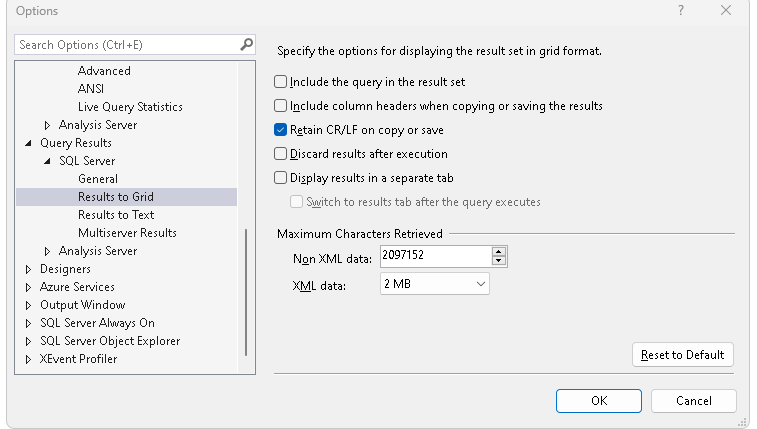
Copy scripts from sql with linebreaks and formatting intact
In SSMS navigate to Tools > Options and set the following: