How to enable encryption
Last modified by Gideon Lombard on 2021/08/12 10:55
Table of Contents
Website
- Open the web.config on the web server with Notepad
- Look for the section with the connection strings
<add name="Everest" connectionString="Data Source=127.0.0.1;Initial Catalog=[database name];Persist Security Info=True;User ID=[username];Password=[password]" ></add>
<add name="Icarus" connectionString="Data Source=127.0.0.1;Initial Catalog=[database name];Persist Security Info=True;User ID=[username];Password=[password]" ></add>
<add name="EverestWriteDB" connectionString="Data Source=127.0.0.1;Initial Catalog=[database name];Persist Security Info=True;User ID=[username];Password=[password]" ></add>
<add name="EverestDocuments" connectionString="Data Source=127.0.0.1;Initial Catalog=[database name];Persist Security Info=True;User ID=[username];Password=[password]" ></add> - If there is not an Encrypt=true and TrustServerCertificate=true as part of the connection string you will need to add it separated with a ;
<add name="Everest" connectionString="Data Source=127.0.0.1;Initial Catalog=Everest_Risk_Demo;Persist Security Info=True;User ID=[username];Password=[password];Encrypt=true;TrustServerCertificate=true" ></add>
<add name="Icarus" connectionString="Data Source=127.0.0.1;Initial Catalog=Everest_Risk_Demo;Persist Security Info=True;User ID=[username];Password=[password];Encrypt=true;TrustServerCertificate=true" ></add>
<add name="EverestWriteDB" connectionString="Data Source=127.0.0.1;Initial Catalog=Everest_Risk_Demo;Persist Security Info=True;User ID=[username];Password=[password];Encrypt=true;TrustServerCertificate=true" ></add>
<add name="EverestDocuments" connectionString="Data Source=127.0.0.1;Initial Catalog=Everest_Risk_Demo_Documents;Persist Security Info=True;User ID=[username];Password=[password];Encrypt=true;TrustServerCertificate=true" ></add>
Everest.NET
- Get the clients current STP file that is provided to the users
- Run the Everest Administrator application and click the STP Connection Files menu item
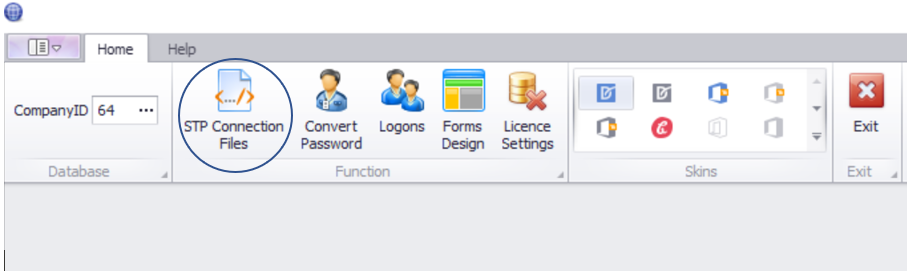
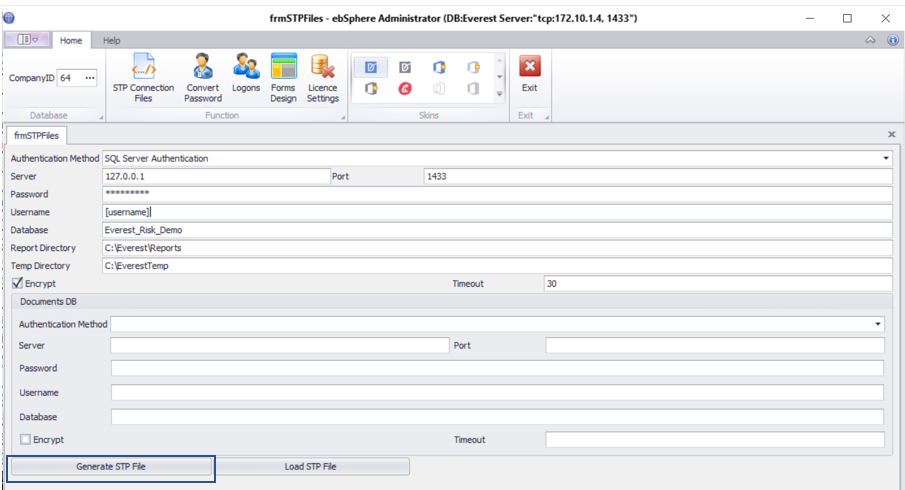
- On the next screen you click the Load STP File and load the STP file of your client

- Ensure that the Encrypt is checked on the connection settings

- Click the Generate STP File and save the STP file again
SMS Service Settings
- Open the Everest_SMSService.exe.config on the web server with Notepad
- Look for the section with the connection strings
<connectionStrings>
<add name="dbConn" providerName="System.Data.SqlClient" connectionString="Data Source=127.0.0.1;Initial Catalog=[database name];Persist Security Info=True;User ID=[username];Password=[password]"></add>
</connectionStrings> - If there is not an Encrypt=true and TrustServerCertificate=true as part of the connection string you will need to add it separated with a ;
<connectionStrings>
<add name="dbConn" providerName="System.Data.SqlClient" connectionString="Data Source=127.0.0.1;Initial Catalog=[database name];Persist Security Info=True;User ID=[username];Password=[password];Encrypt=true;TrustServerCertificate=true"></add>
</connectionStrings>
Parent Service - Client
- Open the EBSParentService.exe.config on the web server with Notepad
- Look for the section with the connection strings
<databaseConnections>
<add key="Everest" value="Data Source=127.0.0.1;Initial Catalog=[database name];User ID=[username];Password=[password]" ></add>
</databaseConnections> - If there is not an Encrypt=true and TrustServerCertificate=true as part of the connection string you will need to add it separated with a ;<databaseConnections>
<add key="Everest" value="Data Source=127.0.0.1;Initial Catalog=[database name];User ID=[username];Password=[password];Encrypt=true;TrustServerCertificate=true" ></add>
</databaseConnections>
Database Settings
Parent Service
UPDATE tblBatchParent SET txtConnStr = REPLACE(txtConnStr, ';Password=', ';Encrypt=true;TrustServerCertificate=true;Password=')
WHERE txtConnStr NOT LIKE '%Encrypt%'
UPDATE tblBatchParent SET txtDocConnStr = REPLACE(txtDocConnStr, ';Password=', ';Encrypt=true;TrustServerCertificate=true;Password=')
WHERE txtDocConnStr NOT LIKE '%Encrypt%'
UPDATE tblBatchParent SET txtConnStrSchedule = REPLACE(txtConnStrSchedule, ';Password=', ';Encrypt=true;TrustServerCertificate=true;Password=')
WHERE txtConnStrSchedule NOT LIKE '%Encrypt%'
UPDATE tblBatchParent_Schedule SET txtConnStrProcess = REPLACE(txtConnStrProcess, ';Password=', ';Encrypt=true;TrustServerCertificate=true;Password=')
WHERE txtConnStrProcess NOT LIKE '%Encrypt%'
UPDATE tblBatchParent_Schedule SET txtDocConnStrProcess = REPLACE(txtDocConnStrProcess, ';Password=', ';Encrypt=true;TrustServerCertificate=true;Password=')
WHERE txtDocConnStrProcess NOT LIKE '%Encrypt%'
WHERE txtConnStr NOT LIKE '%Encrypt%'
UPDATE tblBatchParent SET txtDocConnStr = REPLACE(txtDocConnStr, ';Password=', ';Encrypt=true;TrustServerCertificate=true;Password=')
WHERE txtDocConnStr NOT LIKE '%Encrypt%'
UPDATE tblBatchParent SET txtConnStrSchedule = REPLACE(txtConnStrSchedule, ';Password=', ';Encrypt=true;TrustServerCertificate=true;Password=')
WHERE txtConnStrSchedule NOT LIKE '%Encrypt%'
UPDATE tblBatchParent_Schedule SET txtConnStrProcess = REPLACE(txtConnStrProcess, ';Password=', ';Encrypt=true;TrustServerCertificate=true;Password=')
WHERE txtConnStrProcess NOT LIKE '%Encrypt%'
UPDATE tblBatchParent_Schedule SET txtDocConnStrProcess = REPLACE(txtDocConnStrProcess, ';Password=', ';Encrypt=true;TrustServerCertificate=true;Password=')
WHERE txtDocConnStrProcess NOT LIKE '%Encrypt%'
System Settings
UPDATE prgSystemSettings SET txtDocumentDatabaseConnection = REPLACE(REPLACE(txtDocumentDatabaseConnection, ';pwd=', ';Encrypt=true;TrustServerCertificate=true;pwd='), ';Password=', ';Encrypt=true;TrustServerCertificate=true;Password=')
WHERE txtDocumentDatabaseConnection NOT LIKE '%Encrypt%'
UPDATE prgSystemSettings SET txtDocumentDatabaseConnection = REPLACE(REPLACE(txtAdditionalDocumentDatabaseConnection, ';pwd=', ';Encrypt=true;TrustServerCertificate=true;pwd='), ';Password=', ';Encrypt=true;TrustServerCertificate=true;Password=')
WHERE txtAdditionalDocumentDatabaseConnection NOT LIKE '%Encrypt%'
SSIS Service Steps
UPDATE tblSSISServiceSteps SET txtFromConnectionString = REPLACE(txtFromConnectionString, ';Password=', ';Encrypt=true;TrustServerCertificate=true;Password=')
WHERE txtFromConnectionString NOT LIKE '%Encrypt%'
UPDATE tblSSISServiceSteps SET txtFromConnectionString = REPLACE(txtToConnectionString, ';Password=', ';Encrypt=true;TrustServerCertificate=true;Password=')
WHERE txtToConnectionString NOT LIKE '%Encrypt%'
WHERE txtFromConnectionString NOT LIKE '%Encrypt%'
UPDATE tblSSISServiceSteps SET txtFromConnectionString = REPLACE(txtToConnectionString, ';Password=', ';Encrypt=true;TrustServerCertificate=true;Password=')
WHERE txtToConnectionString NOT LIKE '%Encrypt%'