Benefit Scenarios - DB Funds
CLIENT BENEFITS SCENARIOS - DB FUNDS
BY

Benefit Headers – DB Funds
A defined benefit plan guarantees you a certain benefit when you retire. How much you receive generally depends on factors such as your salary, age, and years of service with the company, regardless of how well the Fund performs.
There are MANY variations between Funds, making it impossible to show each scenario. We will cover the most common scenario to explain how the benefit header fields work together.
Client: Select the relevant Client
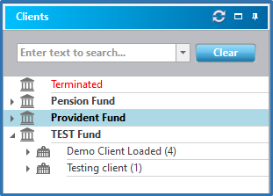
Client Menu: Select Client Benefits

Scenario Example
Benefit calc Pension = Final Average Salary x number of month’s pensionable service x actuarial factor.
Lumpsum = Pension x Annuity Factor
Where Final Average Salary = the average salary for 1 year prior to exit date (this can differ from Fund to Fund and will be dictated in the Rules of the Fund). There is an explanation of how the Final Average Salary is calculated on Everest later in the document.
Actuarial Factor = age related factor (loading of factors is detailed in the Factor Tables manual)
Annuity Factor = age related factor (loading of factors is detailed in the Factor Tables manual)
For an explanation of each available field, please refer to the “Client Benefits – General Guidelines” Manual
The PENSION benefit line on Everest will look like this – note the highlighted fields:


The LUMPSUM benefit line on Everest will look like this – note the highlighted fields:


Final Average Salary (FAS)
The Rules of the Fund will define the Final Average Salary (FAS), if it is used in the calculation of benefits.
The FAS can be the last salary (i.e. the salary earned in the exit month), or the average of a number of year’s salary leading up to the exit date (e.g. salary earned 1 year prior to exit date).
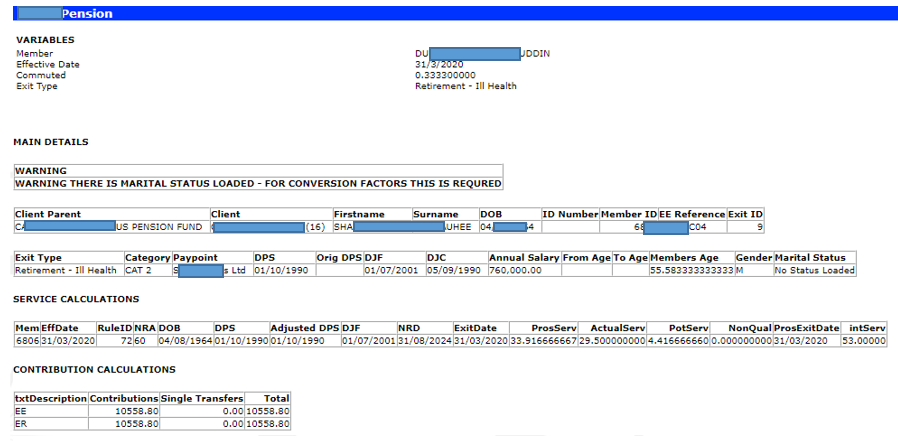
The Member Benefit Enquiry report (detailed in the next section) reflects the FAS that Everest has calculated:

Everest uses the total number of DAYS in the average period (Ave Period on the benefit row) – note that 1 day is added for leap years.

If the member was only a member for part of the average period, the number of days from their first salary on Everest will be used in the calculation AND if there is a leap year there would be an additional day. This makes the calculation on Everest a more accurate calculation than if only the number of months were used.
In the example above:
The Ave Period is indicated as 1 - i.e. 1 year’s average salary.
The member joined 01/12/2019
The member exited 31/03/2020
Therefore, the member was only on the Fund for 5 months.
1 month with a salary of 703 920.00 (Dec), and 4 months with a salary of 760 000.00 (Jan – Mar).
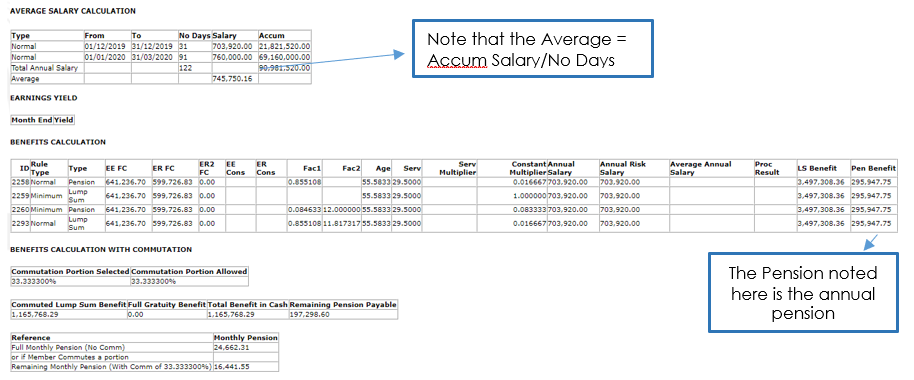
The FAS calculation, in this example, is as follows:
703 920 x 31 = 21 821 520.00 (there are 31 days in Dec)
760 000 x 91 = 69 160 000.00 (there are 91 days from 01/01/2020 – 31/03/2020, including a leap year day in Feb)
Total Accumulated Salary = 21 821 520.00 + 69 160 000.00 = 90 981 520.00
Total Number of Days = 31 + 91 = 122
FAS = 90 981 520.00 / 122 = 745 750.16
The FAS of 745 750.16 will be used in the benefit calculations where Final Average Salary is required.
NB! Average Salary, on Everest, is calculated using the actual NUMBER OF DAYS in the month (which will also include leap years).
Member Benefit Enquiry
The Member Benefit Enquiry is used to view the calculation of Defined Benefits at member level.
Batch Management: Select the batch “Member Benefit Enquiry”

The Commuted percentage must be adjusted to whatever percentage cash/lumpsum the member is taking at exit date. If they are not taking any cash, the percentage would be left as 0%.

Prescribed Minimum Benefit (PMB) / Minimum Individual Reserve (MIR)
South African Defined Benefit Fund benefits are often subject to a Minimum Benefit. If this is the case, it will be detailed in the Rules of the Fund. This is the minimum benefit the member is entitled to as per S14A of the Pension Fund Act. The Earning Yield rates are circulated by the FSB monthly and must be maintained monthly.
Everest will use this rate with the effective date that corresponds to the Exit Date for calculation. These rates are maintained at system level.
Custom Forms Select “User” and then “40% Yield Earnings”

The 40% Yield Earnings screen will come up. Please note that these rates are as at end of the month and effective date should be captured as such. The rate format in this screen is in %. The best method of updating these is to copy directly from the spreadsheet and paste on the screen to avoid any typing error that could occur.

Benefits that are subject to the Minimum Benefit must have an additional benefit line added, which uses the Prescribed Minimum Benefit stored procedure “sp__CalculatePrescMinBenefits”. This stored procedure uses the rate loaded on the “40% Yield Earnings” table.
The Prescribed Minimum Benefit (sometimes referred to as Minimum Individual Reserve – MIR) is calculated by using this formula:
MIR = (GRATUITY + 0.5 x (VALUE OF PENSION + COMMUTATION)) x (1/1 + Index Linked yield) period from date of exit to NRA
An example of the PMB Minimum Benefit line on Everest:

This “Minimum” benefit line effectively calculates the Prescribed Minimum Benefit for this Retirement – Normal Benefit type. When the Retirement – Normal Benefit Type is calculated, Everest will first calculate the “Normal” Benefit Type line, then calculate the “Minimum” Benefit Type Line – the end result will be the higher value of the two benefit lines.

Disclaimer and Copyright
DISCLAIMER
Please note, whilst care is taken to illustrate numerous scenarios, it is impossible to detail all instances and therefore this document should merely serve as a guide for the purposes of demonstrating system functionality and conducting employee training.
In accordance with the above paragraph, this training manual is published and distributed on the basis that EBSphere (Pty) Ltd is not responsible/accountable for any actions taken by users of information contained in this training manual nor for any error in or omission from this manual.
EBSphere (Pty) Ltd does not accept any responsibility whatsoever for a misrepresentation performed by any person in respect of claims, losses or damage or any other matter, either direct or consequential arising out of or in relation to the use and reliance, whether wholly or partially, upon any information contained or products referred to in this manual.
Further, the contents of this training manual are subject to change without any notice and further highlight the need for this training manual to serve only as a guide.
COPYRIGHT
This documentation and the software described in it is the exclusive property of EBSphere (Pty) Ltd. This manual or the software may not be copied in whole or part, without the express written consent of EBSphere (Pty) Ltd. Under the law, copying includes translating into another language or format.
EBSphere (Pty) Limited
P.O. Box 785803
Sandton
2146