Loading Investment Policies
LOADING INVESTMENT POLICIES
BY

Introduction
What is a Managed Fund?
A Managed Fund invests in a wide variety of assets including equities, property, and government bonds.
What is a Unitised Fund?
A Unitised Fund (Unit Trust) is a product that allows investors to pool their money in a wide range of financial instruments such as equities, bonds, and cash. This enables investors in the pool to buy into a diversified portfolio of shares, bonds, money-market, and other financial instruments they would not normally have access to. The total value of the pool of invested money is split into equal portions called units. The unit price depends on the market value of the shares in which the pool of money is invested and is calculated daily.
Unit prices are calculated daily according to net asset value, which is defined as the total market value of all assets in the unit portfolio, including any income accrued, less any permissible deductions from the portfolio divided by the number of units in issue. The value of the units rises and falls depending on market movements.
How do I load my Investments as Managed Funds / Unitised Funds on the Everest System?
The process of loading the Investment Policy as a Managed Fund or Unitised Fund is the same on the Everest system. The User is to indicate whether the Policy is Managed or Unitised by activating the relevant Header in the specific screen below.
Thereafter, for Managed Funds, a Product Price is calculated, via a provided spreadsheet, and imported to Everest. The investment allocation, and unit price calculation, process is documented later in this document.
For Unitised Funds, Unit Prices are imported into the system. These unit prices are provided by the Investment Manager. This process is covered under the Unit Price Management component of the Everest system and is documented later in this Manual.
System Policy Setup
All Investment Products that will be used must be set up at a Sytem Level. The Investment Product information relates to the entire spectrum of Parents and Clients loaded on the Everest System.
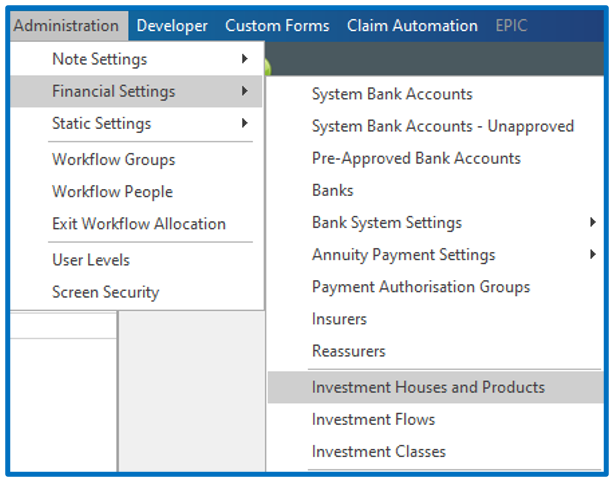
Go to Administration Menu → Financial Settings → Investment Houses and Products:
A list of Investment Houses loaded will be displayed:
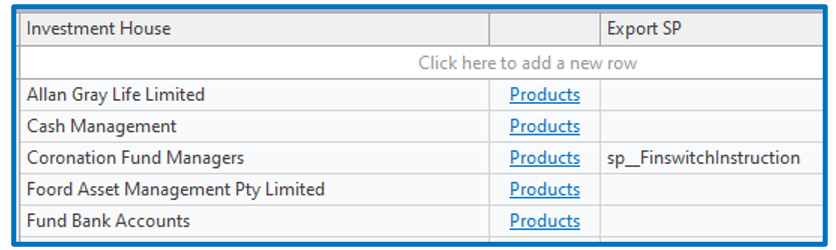
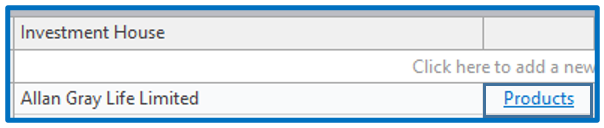
Click on the Products hyperlink for the Investment House you wish add a new Policy to:
The screen that opens will reflect all policies already loaded:
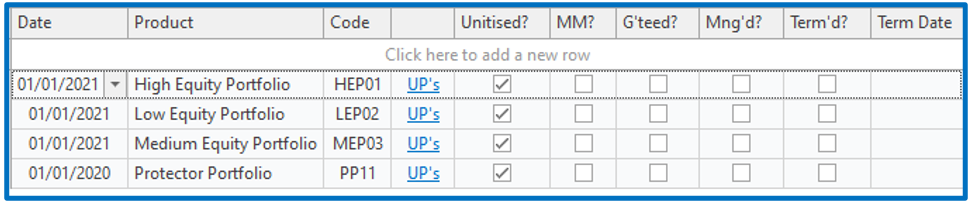
The “Code” field must be populated with the investment code provided by the Investment Manager, specific to the policy. The purpose of the code is for importing policy prices for Unitised Funds:
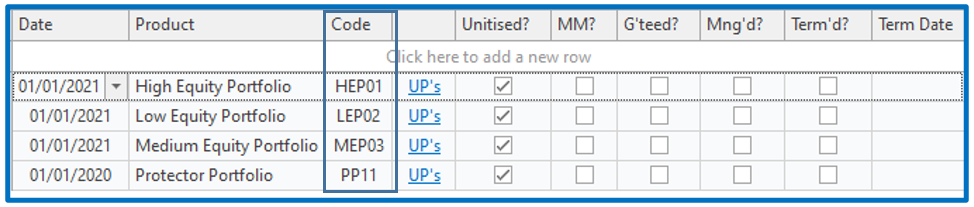
NB! When importing unit prices, ALL Investment Products that have the same code will be updated with the unit price imported. It is imperative that the correct Code is allocated.
To add new Investment Policy Products, click on “Click here to add a new row” and complete the relevant fields:

Unitised?: Is this Product Unitised? If so, click in the check box to flag as ‘Yes’.
*MM?: Is this a Money Market Portfolio? If so, click in the check box to flag as ‘Yes’.
*G’teed?: Is this a Guaranteed Fund? ? If so, click in the check box to flag as ‘Yes’.
Mng’d?: Is this a Managed Fund? If so, click in the check box to flag as ‘Yes’.
*These Headers run on the same basis for Managed (Mng’d) Funds.
Disclaimer and Copyright
DISCLAIMER
Please note, whilst care is taken to illustrate numerous scenarios, it is impossible to detail all instances and therefore this document should merely serve as a guide for the purposes of demonstrating system functionality and conducting employee training.
In accordance with the above paragraph, this training manual is published and distributed on the basis that EBSphere (Pty) Ltd is not responsible/accountable for any actions taken by users of information contained in this training manual nor for any error in or omission from this manual.
EBSphere (Pty) Ltd does not accept any responsibility whatsoever for a misrepresentation performed by any person in respect of claims, losses or damage or any other matter, either direct or consequential arising out of or in relation to the use and reliance, whether wholly or partially, upon any information contained or products referred to in this manual.
Further, the contents of this training manual are subject to change without any notice and further highlight the need for this training manual to serve only as a guide.
COPYRIGHT
This documentation and the software described in it is the exclusive property of EBSphere (Pty) Ltd. This manual or the software may not be copied in whole or part, without the express written consent of EBSphere (Pty) Ltd. Under the law, copying includes translating into another language or format.
EBSphere (Pty) Limited
P.O. Box 785803
Sandton
2146